project / sentinel
Sentinel
Created an offline voice assistant in Python, enabling smart automation without internet dependency.
Sentinel: The Voice Assistant That Actually Respects Your Privacy
We've grown accustomed to the trade-off: convenience in exchange for our data. Every "Hey Siri" and "Alexa" sends our voice recordings into the cloud, processed by distant servers, stored in ways we can't fully understand or control. But what if it didn't have to be this way?
Enter Sentinel—a voice assistant that flips the script entirely.
The Privacy-First Revolution
Sentinel is built on a simple but radical premise: your voice data should never leave your computer. Period.
Unlike conventional voice assistants that require constant internet connectivity and cloud processing, Sentinel operates entirely offline. Every word you speak is processed locally on your Windows machine, powered by OpenAI's Whisper—the same breakthrough technology that's revolutionizing speech recognition across industries.
The result? Lightning-fast responses without the privacy nightmare. No data collection. No surveillance. No compromises.
Under the Hood: Real AI, Zero Compromises
Sentinel doesn't just promise privacy—it delivers genuine intelligence alongside it.
Whisper Integration: At its core, Sentinel leverages OpenAI's Whisper model, a state-of-the-art speech recognition system trained on 680,000 hours of multilingual data. The accuracy rivals—and often exceeds—commercial cloud-based alternatives, except it all happens on your hardware.
Infinitely Customizable: Sentinel isn't locked into a predetermined set of commands. The architecture is designed for extensibility. Want to automate your workflow? Control your smart home devices? Launch complex scripts with a single phrase? The command system is yours to shape.
Performance That Scales: Have a CUDA-capable GPU? Sentinel can harness that power for even faster processing. Running on older hardware? The base model runs smoothly on modest systems, proving that privacy doesn't require expensive hardware.
Getting Sentinel Running: A Developer's Walkthrough
Ready to take control? Here's how to get started.
Prerequisites: You'll need Python 3 (version 3.8 through 3.10 work well, though 3.9.9 is the sweet spot). Make sure it's added to your system PATH during installation.
Setting Up Your Environment:
The beauty of Sentinel is its simplicity. Navigate to the project directory in your terminal. If you have a CUDA-capable GPU and want maximum performance, uncomment the final line in requirements.txt—this enables GPU acceleration at the cost of an additional 2GB download.
For a clean installation, creating a virtual environment is recommended:
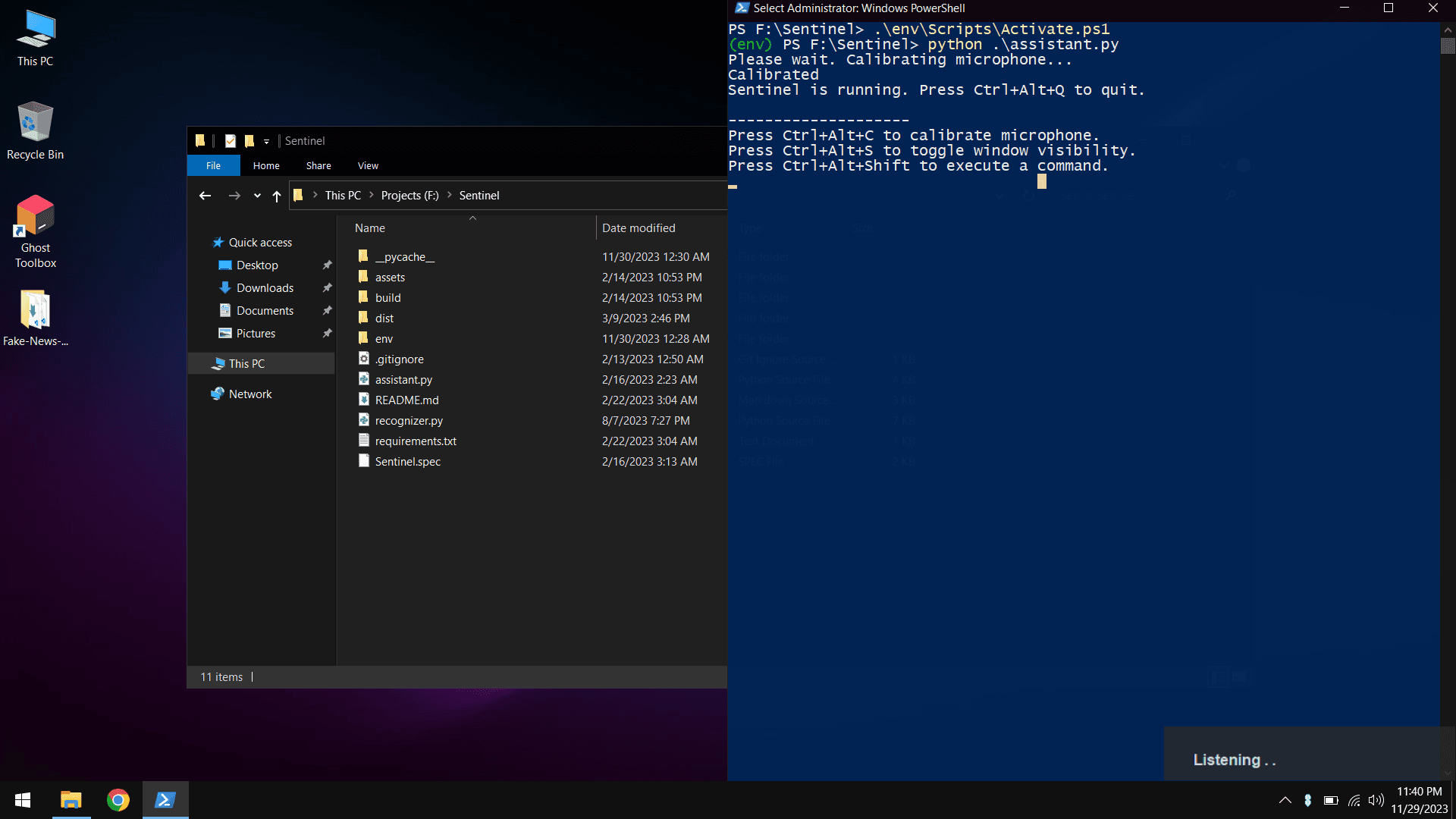
python -m venv env ./env/Scripts/Activate.ps1
Note: Windows users may need to adjust execution policies first:
Set-ExecutionPolicy -ExecutionPolicy RemoteSigned -Scope CurrentUser
Install the dependencies with a simple pip install -r requirements.txt, then launch Sentinel by running assistant.py.
On first launch, Sentinel automatically downloads the Whisper base.en model—approximately 140MB. After this one-time setup, you're completely offline.
Building a Standalone Application:
Want to share Sentinel or run it without a Python installation? Install PyInstaller and run pyinstaller ./Sentinel.spec from the project directory. Your standalone application will appear in the dist folder, ready to deploy.
What Sentinel Can Do (Out of the Box)
Sentinel comes configured with practical, everyday commands that showcase its potential:
Web Navigation: Launch YouTube, Gmail, WhatsApp, Stack Overflow, or Udemy with simple voice commands. No typing, no clicking—just speak.
Application Control: Open Chrome, VS Code, or Anaconda Navigator instantly. Paths are easily customizable in recognizer.py to match your system configuration.
Intelligent Search: Prefix any query with "YouTube" or "Google" and Sentinel opens a search in your default browser. "YouTube machine learning tutorials" or "Google best pizza near me"—it just works.
Keyboard Shortcuts: Power User Features
Sentinel respects that voice isn't always the answer. Strategic keyboard shortcuts provide precise control:
- Ctrl + Alt + Shift — Activate voice listening mode
- Ctrl + Alt + Q — Close Sentinel completely
- Ctrl + Alt + C — Calibrate your microphone for optimal accuracy
- Ctrl + Alt + S — Toggle the application window visibility
The Bigger Picture: Why This Matters
Voice assistants have become ubiquitous, yet most people have little understanding of where their voice data goes or how it's used. Security breaches happen. Privacy policies change. Companies get acquired.
Sentinel represents a different philosophy: technology that serves you without surveilling you. It's open, auditable, and completely under your control. Want to verify no data leaves your machine? The code is there. Want to add features? The architecture welcomes it.
In a world where privacy increasingly feels like a luxury, Sentinel proves it can be the default.
Get Started Today
The latest release is available in the releases section. Whether you're a privacy advocate, a developer looking for a foundation to build on, or simply someone tired of feeding your conversations to corporate servers, Sentinel offers a genuine alternative.
Download it. Customize it. Make it yours.
Because your voice—and what you do with it—should belong to you alone.